# GEOfetch




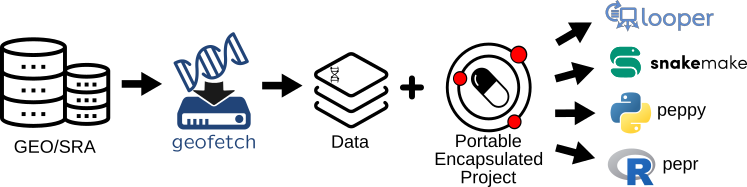
`geofetch` is a command-line tool that downloads and organizes data and metadata from GEO and SRA. When given one or more GEO/SRA accessions, `geofetch` will:
- Download either raw or processed data from either [SRA](https://www.ncbi.nlm.nih.gov/sra) or [GEO](https://www.ncbi.nlm.nih.gov/geo/)
- Produce a standardized [PEP](http://pepkit.github.io) sample table. This makes it really easy to run [looper](https://pepkit.github.io/docs/looper/)-compatible pipelines on public datasets by handling data acquisition and metadata formatting and standardization for you.
- Prepare a project to run with [sraconvert](/geofetch/sra-convert.md) to convert SRA files into FASTQ files.
## Key geofetch advantages:
- Works with GEO and SRA metadata
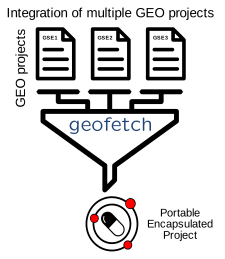
- Combines samples from different projects
- 
- Standardizes output metadata
- Filters type and size of processed files (from GEO) before downloading them
- Easy to use
- Fast execution time
- Can search GEO to find relevant data
- Can be used either as a command-line tool or from within Python using an API
## Quick example
`geofetch` runs on the command line. This command will download the raw data and metadata for the given GSE number.
```console
geofetch -i GSE95654
```
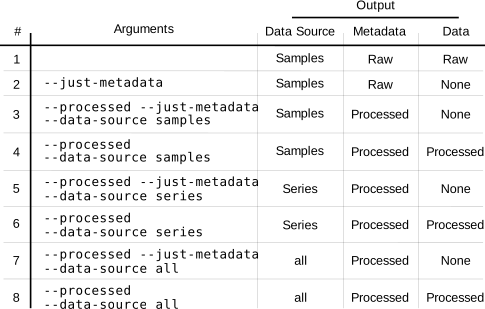
You can add `--processed` if you want to download processed files from the given experiment.
```console
geofetch -i GSE95654 --processed
```
You can add `--just-metadata` if you want to download metadata without the raw SRA files or processed GEO files.
```console
geofetch -i GSE95654 --just-metadata
```
```console
geofetch -i GSE95654 --processed --just-metadata
```
**Note:** We ensure that GEOfetch is compatible with Unix, Linux, and MacOS.
However, due to dependencies, some features of GEOfetch may not be available on Windows.
### Check out what exactly argument you want to use to download data:
---
### New features available in geofetch 0.11.0:
1) Now geofetch is available as Python API package. Geofetch can initialize [peppy](http://peppy.databio.org/) projects without downloading any soft files. Example:
```python
from geofetch import Geofetcher
# initiate Geofetcher with all necessary arguments:
geof = Geofetcher(processed=True, acc_anno=True, discard_soft=True)
# get projects by providing as input GSE or file with GSEs
geof.get_projects("GSE160204")
```
2) Now to find GSEs and save them to file you can use `Finder` - GSE finder tool:
```python
from geofetch import Finder
# initiate Finder (use filters if necessary)
find_gse = Finder(filters='bed')
# get all projects that were found:
gse_list = find_gse.get_gse_all()
```
Find more information here: [GSE Finder](/geofetch/gse-finder.md)
For more details, check out the [usage](/geofetch/code/usage.md) reference, [installation instructions](/geofetch/install.md), or head on over to the [tutorial for raw data](/geofetch/code/raw-data-downloading.md) and [tutorial for processed data](/geofetch/code/processed-data-downloading.md) for a detailed walkthrough.