# pepembed
## Overview
PEPembed is a Python package for computing text-embeddings of sample metadata stored in [pephub](https://github.com/pepkit/pephub) for search-and-retrieval tasks. It provides both a CLI and a Python API. It handles the long-running job of downloading projects inside pephub, mining any relevant metadata from them, computing a rich text embedding on that data, and finally upserting it into a vector database. We use [qdrant](https://qdrant.tech/) as our vector database for its performance and simplicity and payload capabilities.
Understand everything? Jump to [running `pepembed`](#install-and-run). Or view the quick start below.
## Quick Start
```console
pip install .
```
```console
pepembed \
--postgres-host $POSTGRES_HOST \
--postgres-user $POSTGRES_USER \
--postgres-password $POSTGRES_PASSWORD \
--postgres-db $POSTGRES_DB \
```
## Architecture
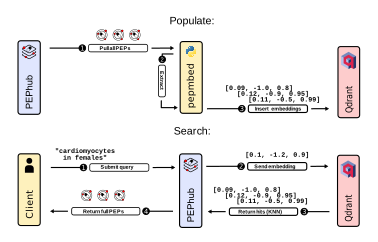
`pepembed` works in three steps: 1) Download PEPs from pephub, 2) Extract metadata from these PEPs and embeds them using a [sentence transformer](https://www.sbert.net/), and 3) inserts these PEPs into a [qdrant](https://qdrant.tech/) instance.
**1. Download PEPs:**
`pepembed` downloads all PEPS from pephub. This is the most time-consuming process. Currently there is no way to parametrize this, but in the future we should. We should also allow for generating embeddings straight from files on disc.
**2. Extract Metadata from PEPs and embeddings:**
Once the PEPs are downloaded, we then extract any relevant metadata from them. This is done by looking for **keywords** in the [**project-level** attributes](https://pep.databio.org/en/latest/specification/#project-attribute-sample_modifiers). For each PEP, a pseudo-description is built by looking for these keywords and building a string. Some example keyword attributes might be: `cell_type`, `protocol`, `procedure`, `institution`, etc. You can specify your own keywords to `pepembed` if you wish.

Once the pseudo-descriptions are mined, we can then utilize a `sentence-transformer` to generate low-dimensional representations of these descriptions. By default, we use a [state-of-the-art transformer](https://arxiv.org/abs/1908.10084) trained for the semantic textual similarity task (*Reimers & Gurevych, 2019*). The embeddings are linked back to the original PEP registry path, along with other information like the mined pseudo-description and the row id in the database.
**3. Insert Embeddings:**
Finally, we insert the embeddings into a [qdrant](https://qdrant.tech/) instance. qdrant is a **vector database** that is designed to store embeddings as first-class data types as well as supporting native graph-based indexing of these embeddings. The allows for near-instant search and retrieval of nearest embeddings neighbors given a new embedding (say an encoded search query on a web application). qdrant supports arming the embeddings with a [**payload**](https://qdrant.tech/documentation/payload/) where we store basic information on that PEP like registry path, row id, and its description.
## Install and Run
While simple to install and run, `pepembed` requires lots of information to function. There are three key aspects: 1) The pephub instance, 2) the qdrant instance, and 3) the keywords. Ensure the following before running the `cli`:
### Setup
**1. PEPhub instance:**
Make sure you have access to a running pephub instance store with peps. Once complete, you can use the following environment variables to tell `pepembed` where to get data. Alternatively, you can pass these as command-line args:
* `POSTGRES_HOST`
* `POSTGRES_DB`
* `POSTGRES_USER`
* `POSTGRES_PASSWORD`
**2. Qdrant instance:**
In addition to a pephub instance, you will need a running instance of qdrant. It is quite simple and instructions can be found [here](https://qdrant.tech/documentation/quick_start/). The TL;DR is:
```console
docker pull qdrant/qdrant
docker run -p 6333:6333 \
-v $(pwd)/qdrant_storage:/qdrant/storage \
qdrant/qdrant
```
This will give you a qdrant instance served at http://localhost:6333. You can pass this information to `pepembed` as environment variables. Alternatively, you may pass these as command-line args:
* `QDRANT_HOST`
* `QDRANT_PORT`
* `QDRANT_API_KEY`
* `QDRANT_COLLECTION_NAME`
*Unless you are running this for production, you most likely do not need to specify any of these.*
**3. Keywords:**
Finally, we need a keywords file. This is technically optional, and `pepembed` comes with [default keywords](https://github.com/pepkit/pepembed/blob/master/pepembed/const.py), but you may supply your own as a plain text file. This can be supplied only as command-line args:
* `KEYWORDS_FILE`
There are many other options as well (like specifying the transformer model to use), but the defaults work great for a first try. Use `pepembed --help` to see all options. If you are like me, and like to keep your secrets in a `.env` file, you can export them easily to the environment with `export $(cat .env | xargs)`
### Install
Clone this repository and install with `pip`:
```console
pip install .
```
### Run
```console
pepembed \
--keywords-file keywords.txt \
--postgres-host $POSTGRES_HOST \
--postgres-user $POSTGRES_USER \
--postgres-password $POSTGRES_PASSWORD \
--postgres-db $POSTGRES_DB \
```